2020年10月14日 星期三

2020年10月6日 星期二
Chome直接預覽PDF 造成 setRedirect(false) 的作法Class內容遺失, 下載PDF會失敗
Chome直接預覽PDF 造成 setRedirect(false) 的作法Class內容遺失, 下載PDF會失敗
==> 外面包一層強制下載PDF
PS. Controller & extensions 要一致
Style要再寫才能顯示中文,跟頁面大小
<apex:page standardController="Account" extensions="TW_InvestmentReport" contentType="application/vnd.ms-pdf#output.pdf">
<head>
<style type="text/css" media="print">
@page {
@top-center {
content: element(header);
}
@bottom-left {
content: element(footer);
}
size: 297mm 210mm;
margin: 15mm;
margin-right:0mm;
margin-top: 2.80cm;
margin-bottom: 2.80cm;
margin-left: 1.27cm;
margin-right:1cm;
}
body { font-family:Arial Unicode MS; font-size:10px;}
</style>
</head>
<apex:include pageName="TW_InvestmentReportPDF"/>
</apex:page>
<head>
<style type="text/css" media="print">
@page {
@top-center {
content: element(header);
}
@bottom-left {
content: element(footer);
}
size: 297mm 210mm;
margin: 15mm;
margin-right:0mm;
margin-top: 2.80cm;
margin-bottom: 2.80cm;
margin-left: 1.27cm;
margin-right:1cm;
}
body { font-family:Arial Unicode MS; font-size:10px;}
</style>
</head>
<apex:include pageName="TW_InvestmentReportPDF"/>
</apex:page>
2020年9月21日 星期一
Lightning New Page 網頁轉址傳送參數
Custom Button URL Hacking in Salesforce Lightning Experience vs Salesforce Classic
To Show Record Type Selection in Record’s Create Page with Default Field Values:-
/lightning/o/Contact/new?useRecordTypeCheck=1
Set Default Record Type value in Record’s Create Page with Default Field Values:-
Note: recordTypeId (here recordTypeId follow the case sensitive i.e T and I capital letters)
/lightning/o/Contact/new?recordTypeId=0122v000001SmZ2AAK&
defaultFieldValues=
LastName={!URLENCODE(Account.Name)},
Phone={!Account.Phone},
Languages__c=English
Set Date field values in Record’s Create Page with Default Field Values:-
/lightning/o/Contact/new?recordTypeId=0122v000001SmZ2AAK&
defaultFieldValues=
LastName={!URLENCODE(Account.Name)},
Phone={!Account.Phone},
DateOfBirth__c={!TEXT(TODAY() )}
To pass the date value to convert as String value using TEXT() – https://releasenotes.docs.salesforce.com/en-us/spring20/release-notes/rn_lc_navigate_to_record_dfv.htm
參考網址:
2019年11月3日 星期日
[Salesforce] Pass field value to new record page
some ID field: e.g. CF00…. This corresponds to the ID of the field that you want to be prepopulated. This will always be the text that is displayed in the box.{some ID field}_lkid: e.g. CF00…_lkid. If the field in question is a lookup or master-detail, then this field should be set to the resulting record ID {some other ID field}. Note that in this case, the actual non _lkid field is irrelevant, and not consulted.
Answer for your question
/500/e?
CF00NC0000005Au31={!opportunity.name}&
CF00NC0000005Au31_lkid={!Opportunity.Id}
&RecordType=012C0000000MK5d
Should populate the opportunity in the lookup field
2019年5月17日 星期五
2019年4月6日 星期六
Get Rich Text Image URLs and Blob Data
Get Rich Text Image URLs and Blob Data
// use reluctant regex to match each image tag individually
// https://docs.oracle.com/javase/tutorial/essential/regex/quant.html
Matcher imgMatcher = Pattern.compile( '<img(.+?)>' ).matcher( record.richTextField__c );
// iterate each image tag found
while ( imgMatcher.find() ) {
// get the image tag html
String imageTag = imgMatcher.group();
System.debug( 'imageTag=' + imageTag );
// get the value of the src attribute
// the leading space is significant to avoid other attributes like data-cke-saved-src
String imageURL = imageTag.substringBetween( ' src="', '"' );
System.debug( 'imageURL=' + imageURL );
// if url contained parameters they might be html escaped, unescape them
// or, more conservatively, replace '&' with '&'
String decodedURL = imageURL.unescapeHtml4();
System.debug( 'decodedURL=' + decodedURL );
// note, as of API 34.0 or later, getContent() is considered an http callout
// so take that into consideration for your unit tests and governor limits
// https://developer.salesforce.com/docs/atlas.en-us.pages.meta/pages/apex_System_PageReference_getContent.htm
PageReference page = new PageReference( decodedURL );
Blob b = page.getContent();
System.debug( 'blob=' + b );
System.debug( 'Enjoy your Blob, save it as a Document, ContentVersion, whatever!' );
System.debug(''); // I like blank lines in my logs, easier to scan/read =)
}Link:https://salesforce.stackexchange.com/questions/91692/get-images-from-rich-text-area-via-apex
2019年3月28日 星期四
處理Salesforce RichText 無法 Render問題
參考連結:
https://medium.com/@toninotrip/how-to-re-render-an-apex-inputtextarea-in-visualforce-9452c8b80b57
https://andrewbcummings.wordpress.com/2013/07/19/salesforce-richtext-fail-rerender-is-not-currently-supported-with-rich-text-editing-enabled/
2019年3月25日 星期一
Salesforce執行commandbutton前出現確認視窗
Salesforce執行commandbutton前出現確認視窗
請使用以下方式才可以
請使用以下方式才可以
<apex:commandButton value="Warning" onclick="if (!confirm('Do you want to proceed?')) return false;" action="{!sort}" rerender="updateArea" />
2019年1月7日 星期一
Disable browser caching for Lightning Components
Disable browser caching for Lightning Components
- From Setup, locate the link to ‘Session Settings’
- Locate the ‘Caching’ section
- Uncheck the option to ‘Enable secure and persistent browser caching to improve performance’

URL:https://www.desynit.com/dev-zone/salesforce-development/disable-browser-caching-for-lightning-components/
2019年1月3日 星期四
Lightning Edit Form Picklist無法正常顯示問題
Lightning Edit Form Picklist無法正常顯示問題
於recordEditForm需指定RecordTypeId
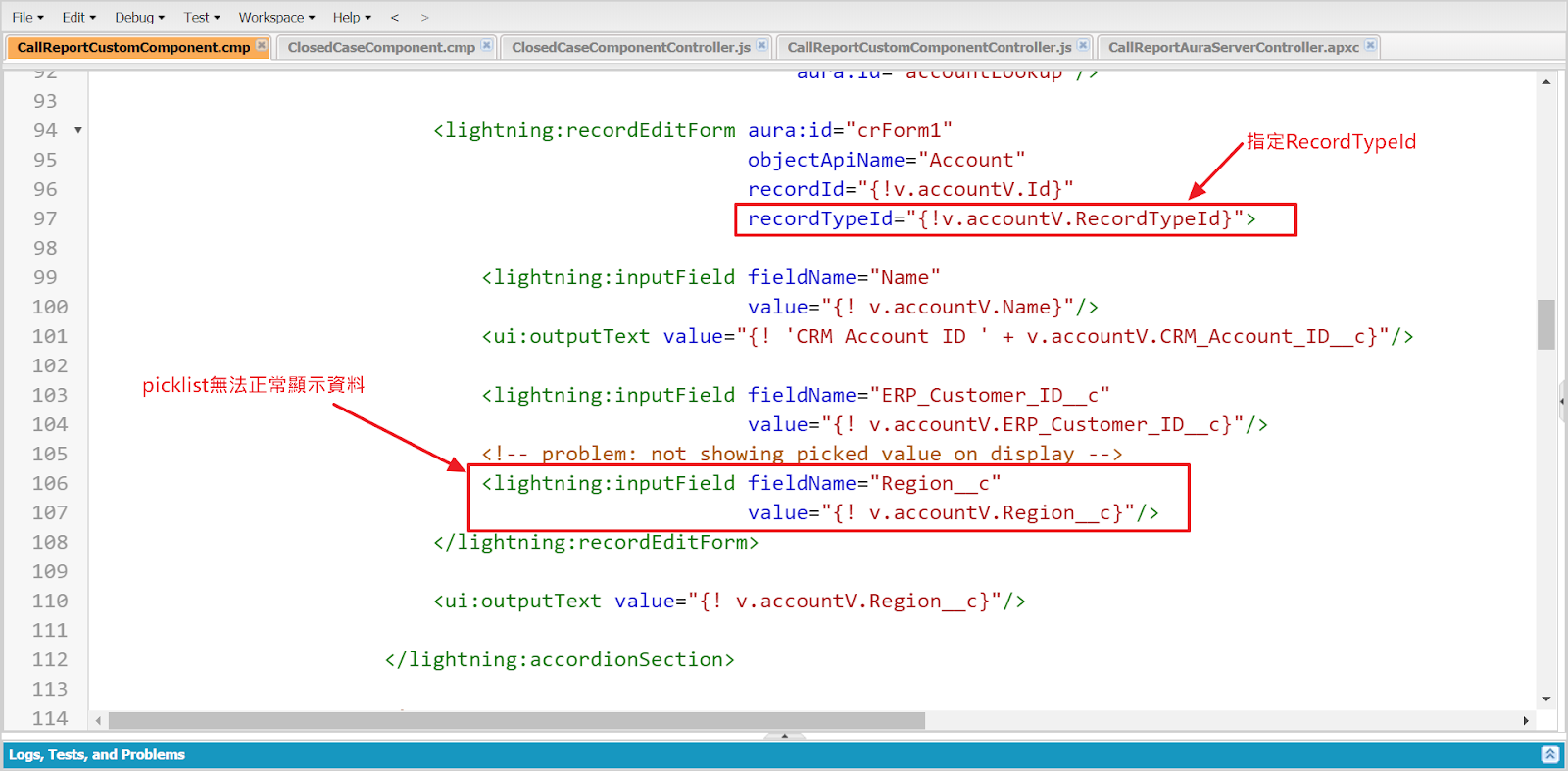
且Account initial時要初始化RecordTypeId

2018年12月26日 星期三
2018年12月17日 星期一
於Salesforce Lightning中判斷使用裝置
How To Detect a Device In Salesforce Lightning Component ?
{!$Browser.isTablet} > To detect the tablet device
{!$Browser.isPhone} > To detect the user is in Mobile Phone / mobile browser
{!$Browser.isAndroid} > To detect the user is in Android device
{!$Browser.formFactor} > Returns a FormFactor enum value based on the type of hardware the browser is running on.
{!$Browser.isPhone} > To detect the user is in Mobile Phone / mobile browser
{!$Browser.isAndroid} > To detect the user is in Android device
{!$Browser.formFactor} > Returns a FormFactor enum value based on the type of hardware the browser is running on.
DESKTOP for a desktop client
PHONE for a phone including a mobile phone with a browser and a smartphone
TABLET for a tablet client (for which isTablet returns true)
PHONE for a phone including a mobile phone with a browser and a smartphone
TABLET for a tablet client (for which isTablet returns true)
Component:
<aura:component>
<aura:if isTrue="{!$Browser.isTablet}">
You are using a tablet device
( <lightning:icon iconName="utility:tablet_portrait" size="x-small" alternativeText="Indicates approval"/> ).
</aura:if>
<aura:if isTrue="{!$Browser.isPhone}">
You are using a phone
( <lightning:icon iconName="utility:phone_portrait" size="x-small" alternativeText="Indicates approval"/> ).
This message is rendered using isPhone <br />
</aura:if>
<aura:if isTrue="{!$Browser.isIPhone}">
You are using an IPhone, If it is IPhone X, _/\_ <br />
</aura:if>
<aura:if isTrue="{!$Browser.formFactor == 'DESKTOP'}">
You are using a DESKTOP
( <lightning:icon iconName="utility:desktop" size="x-small" alternativeText="Indicates approval"/> )
Browser device
</aura:if>
<aura:if isTrue="{!$Browser.formFactor == 'PHONE'}">
You are using a Phone, This message is rendered using formFactor
</aura:if>
<aura:if isTrue="{!$Browser.formFactor == 'TABLET'}">
You are using a Table device
</aura:if>
</aura:component>
App:
<aura:application extends="force:slds">
<c:DetectMyDevice />
</aura:application>
Link:http://sfdcmonkey.com/2018/01/15/detect-device-lightning-component/
訂閱:
文章 (Atom)