
2019年4月6日 星期六
Get Rich Text Image URLs and Blob Data
Get Rich Text Image URLs and Blob Data
// use reluctant regex to match each image tag individually
// https://docs.oracle.com/javase/tutorial/essential/regex/quant.html
Matcher imgMatcher = Pattern.compile( '<img(.+?)>' ).matcher( record.richTextField__c );
// iterate each image tag found
while ( imgMatcher.find() ) {
// get the image tag html
String imageTag = imgMatcher.group();
System.debug( 'imageTag=' + imageTag );
// get the value of the src attribute
// the leading space is significant to avoid other attributes like data-cke-saved-src
String imageURL = imageTag.substringBetween( ' src="', '"' );
System.debug( 'imageURL=' + imageURL );
// if url contained parameters they might be html escaped, unescape them
// or, more conservatively, replace '&' with '&'
String decodedURL = imageURL.unescapeHtml4();
System.debug( 'decodedURL=' + decodedURL );
// note, as of API 34.0 or later, getContent() is considered an http callout
// so take that into consideration for your unit tests and governor limits
// https://developer.salesforce.com/docs/atlas.en-us.pages.meta/pages/apex_System_PageReference_getContent.htm
PageReference page = new PageReference( decodedURL );
Blob b = page.getContent();
System.debug( 'blob=' + b );
System.debug( 'Enjoy your Blob, save it as a Document, ContentVersion, whatever!' );
System.debug(''); // I like blank lines in my logs, easier to scan/read =)
}Link:https://salesforce.stackexchange.com/questions/91692/get-images-from-rich-text-area-via-apex
2019年3月28日 星期四
處理Salesforce RichText 無法 Render問題
參考連結:
https://medium.com/@toninotrip/how-to-re-render-an-apex-inputtextarea-in-visualforce-9452c8b80b57
https://andrewbcummings.wordpress.com/2013/07/19/salesforce-richtext-fail-rerender-is-not-currently-supported-with-rich-text-editing-enabled/
2019年3月25日 星期一
Salesforce執行commandbutton前出現確認視窗
Salesforce執行commandbutton前出現確認視窗
請使用以下方式才可以
請使用以下方式才可以
<apex:commandButton value="Warning" onclick="if (!confirm('Do you want to proceed?')) return false;" action="{!sort}" rerender="updateArea" />
2019年1月7日 星期一
Disable browser caching for Lightning Components
Disable browser caching for Lightning Components
- From Setup, locate the link to ‘Session Settings’
- Locate the ‘Caching’ section
- Uncheck the option to ‘Enable secure and persistent browser caching to improve performance’

URL:https://www.desynit.com/dev-zone/salesforce-development/disable-browser-caching-for-lightning-components/
2019年1月3日 星期四
Lightning Edit Form Picklist無法正常顯示問題
Lightning Edit Form Picklist無法正常顯示問題
於recordEditForm需指定RecordTypeId
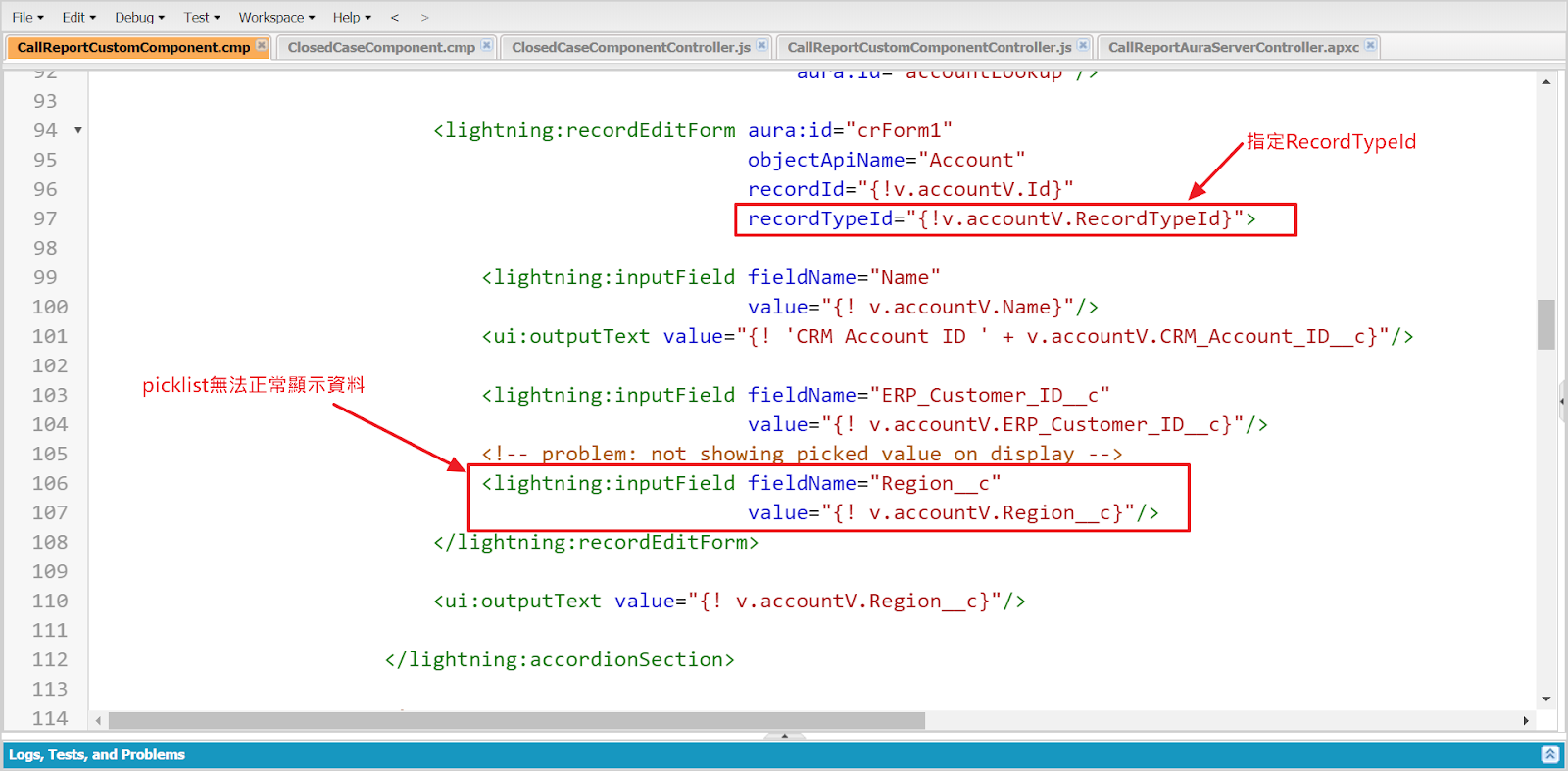
且Account initial時要初始化RecordTypeId

2018年12月26日 星期三
訂閱:
文章 (Atom)